 Koezu
For anyone who presents or explains伝える、すべての人に
Slides that compute and speak.
動いて、語りかけるスライド。
Koezu is an AI-native slide editor. Describe a simulation, chart or calculator in one sentence, and it runs on your slide. Then narrate it, translate it in one click, share it to any phone or export a video.
Koezuは、AIを組み込んだスライドエディターです。シミュレーションやグラフ、計算ツールを一文で書けば、スライドの中で動きます。ナレーション、ワンクリック翻訳、スマートフォンへの共有、動画の書き出しまで。

Try:操作してみよう: Drag the gripper, or move θ₁ and θ₂. Press → for the Jacobian slide.
Not a video. Real Koezu slides, running in your browser. Only pictures load until you press Run.動画ではありません。Koezuのスライドそのものが、このページで動きます。「スライドを動かす」を押すまで、読み込むのは画像だけです。← → move · P notes · the pen draws on the slide · Esc ends← → 移動 · P ノート · ペンで書き込み · Esc 終了
From one sentence to a talk that travels
一文から、どこへでも届く発表へ
Live slides from one sentence
一文から、動くスライドを
Describe a simulation, chart or calculator and Koezu’s AI writes a block that runs inside the slide, with sliders you use as you talk. Or start from its library.
シミュレーション、グラフ、計算ツールを一文で説明すると、KoezuのAIがスライドの中で動くブロックを作ります。話しながらスライダーで操作できます。ライブラリから選ぶこともできます。
Describe it; the AI writes a block that runs.
一文で書くと、AIが動くブロックに。
Run the examples above上の例を動かしてみる ↑Every language in one click
ワンクリックで多言語に
Review › Languages translates the whole deck into any of 24 languages, right to left for Arabic, Urdu and Persian. The layout, charts and live blocks stay as they are; only the words change.
「校閲 › 言語」で、デッキ全体を24言語のいずれにも翻訳できます。アラビア語・ウルドゥー語・ペルシア語は右から左へ。レイアウトもグラフもライブブロックもそのままで、言葉だけが変わります。
A whole deck, in any of 24 languages.
デッキ全体を、24言語に。
Try it below, in nine languages下の例で9言語を試せます ↓Narration, voices and captions
ナレーション・音声・字幕
Record narration over your slides, or let a natural voice read your notes. Add captions in each language, or a dubbed voice in another one.
スライドに合わせてナレーションを録音するか、ノートを自然な音声で読み上げます。言語ごとの字幕や、別の言語の吹き替えも付けられます。
Record, or let a natural voice read.
録音も、自然な音声での読み上げも。
LaTeX, tables and charts
LaTeX・表・グラフ
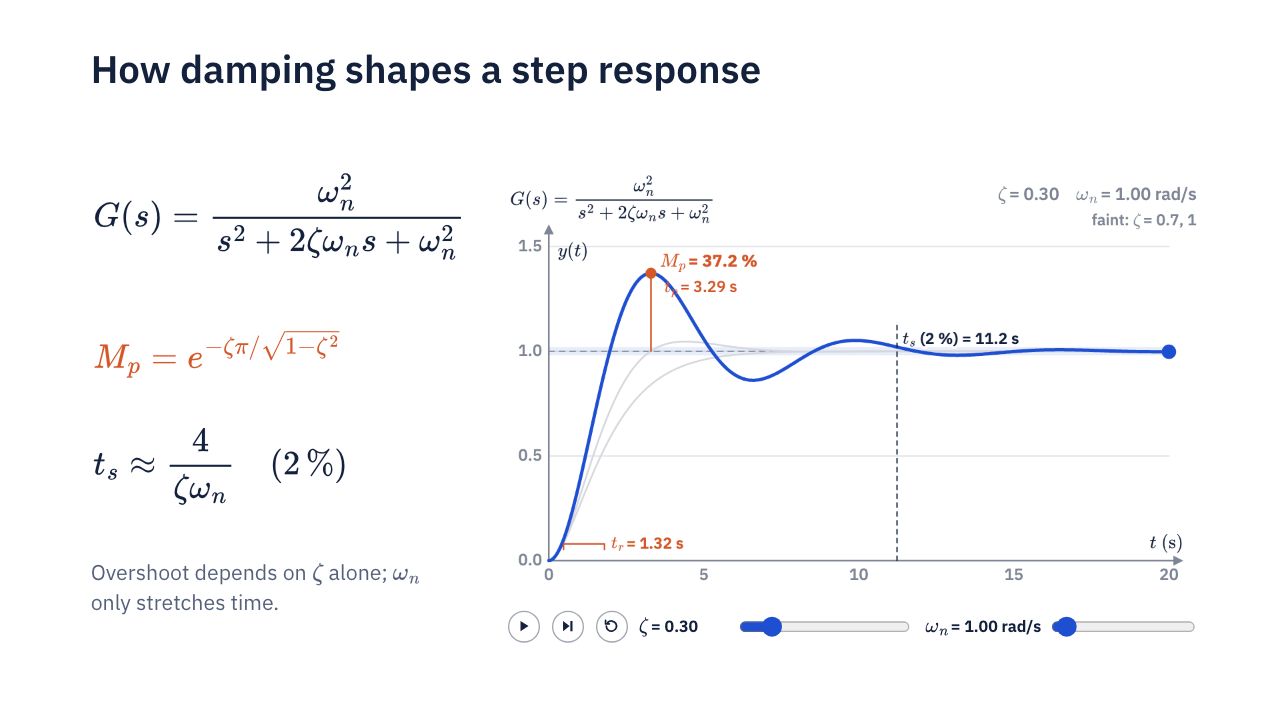
Type LaTeX and it is typeset on the slide and inside live blocks, numbered if you like. Tables and charts are real objects you can edit.
LaTeXで書けば、スライド上でもライブブロックの中でも組版されます。式番号も付けられます。表やグラフは編集できるオブジェクトです。
Typeset math; tables and charts you can edit.
数式は組版、表とグラフは編集可能。
See the step responseステップ応答の例で ↓PowerPoint in and out
PowerPointの読み込みと書き出し
Open a .pptx and keep working: charts and tables arrive as objects you can edit. Export back to PowerPoint or PDF whenever someone needs one.
.pptxを開いて、そのまま作業を続けられます。グラフや表は編集できるオブジェクトとして読み込まれます。必要なときはいつでもPowerPointやPDFに書き出せます。
Open a .pptx; export .pptx or PDF.
.pptxを開き、.pptxやPDFに書き出し。
See the DC motor exampleDCモータの例で ↓A link that opens on any phone
スマートフォンで開ける共有リンク
Share a link: people watch, step through and use the live blocks on their phone, with no app and no account. Edit together with colleagues in real time.
リンクを共有すれば、アプリもアカウントもなしに、スマートフォンでスライドを見て、ライブブロックを操作できます。同僚とリアルタイムで共同編集もできます。
No app and no account to watch.
見る側は、アプリもアカウントも不要。
Export a video
動画に書き出す
Turn a narrated deck into a video for a course site, a conference or YouTube. Live blocks are drawn into it frame by frame.
ナレーション付きのデッキを、講座サイトや学会、YouTube向けの動画に書き出せます。ライブブロックもコマごとに描き込まれます。
A narrated deck becomes a video.
ナレーション付きのデッキを動画に。
HTML you keep editing
いつまでも編集できるHTML
A deck is a web page you own. Save it as one HTML file that opens in any browser, and open it in Koezu again to keep editing, next week or in five years.
デッキは、あなたが持つ一つのWebページです。どのブラウザでも開けるHTMLファイルとして保存でき、何年後でもKoezuで開いて編集を続けられます。
One HTML file, yours to keep.
一つのHTMLファイルとして手元に。
One deck, every language
一つのデッキを、あらゆる言語で
Review › Languages translates a whole deck into any of 24 languages in one click, with Koezu translation or your own AI, and keeps every language in the same file. The layout, the chart and the calculator stay put; only the words change, and Arabic, Urdu and Persian run right to left. This example carries nine:
「校閲 › 言語」は、Koezuの翻訳機能またはご自身のAIで、デッキ全体をワンクリックで24言語に翻訳でき、すべての言語を同じファイルに保存します。レイアウトもグラフも計算ツールもそのままで、言葉だけが変わります。アラビア語・ウルドゥー語・ペルシア語は右から左へ。この例には9言語が入っています:

The deck’s nine languages were set up with Review › Languages. The translations on this page were written and checked by hand, so they are not a sample of machine output. In the slides, the globe button in the bar switches languages too.このデッキの9言語は「校閲 › 言語」で用意しました。このページの翻訳は人の手で書き、確認したもので、機械翻訳の出力例ではありません。スライドのバーの地球のボタンでも言語を切り替えられます。
Three things worth trying yourself
ご自身で試してほしい、三つのこと
01Start from the PowerPoint you haveいまのPowerPointから始める
Open a .pptx and keep working on it: charts and tables come in as objects you can edit, not pictures. Export back to PowerPoint or PDF whenever you need to.
.pptxを開いて、そのまま編集を続けられます。グラフや表は画像ではなく、編集できるオブジェクトとして読み込まれます。必要なときはいつでもPowerPointやPDFに書き出せます。
How faithfully PowerPoint files come through, measuredPowerPointファイルの再現性(測定結果) →
02Simulations from the libraryライブラリのシミュレーション
Koezu’s library has simulations, charts and effects ready to drop on a slide and restyle. Here, a spring, mass and damper in a chalkboard look, then a derivation that builds one line per click.
Koezuのライブラリには、スライドに置いてすぐ使えるシミュレーションやグラフ、エフェクトがそろっています。この例は黒板スタイルのばね・質量・ダンパ系と、クリックごとに一行ずつ進む導出です。

03Equations in LaTeX, on the slide and in the plot数式はLaTeXで、スライドにもグラフにも
Type LaTeX and the equation is typeset on the slide, numbered if you like. Inside a live block, the axis labels and readings are typeset by the same engine.
LaTeXで書けば、スライド上にそのまま組版されます。式番号も付けられます。ライブブロックの中の軸ラベルや数値の表示も、同じエンジンで組版されます。

Made for anyone who explains something
研究・教育・ビジネスの現場で
- Researchers研究者Lab meetings and conference talks with figures that move.研究室のミーティングや学会発表に、動く図を。
- Students学生Seminars, theses and defences that explain themselves.ゼミや卒論・修論の発表を、わかりやすく。
- Engineers and technical teamsエンジニア・技術チームDesign reviews with the calculator on the slide.設計レビューに、その場で使える計算ツールを。
- Educators and trainers教員・研修講師Lectures and courses, narrated in two languages.講義や研修を、二つの言語のナレーション付きで。
- Conference speakers学会・カンファレンスの登壇者A live demo inside the talk, with no switch to another app.別のアプリに切り替えず、スライドの中でデモを。
- Tutorial makersチュートリアル制作者Narrated videos and links in the languages of your viewers.視聴者の言語で、ナレーション付きの動画とリンクを。
- Companies企業のプレゼンターProduct and business explainers people can try for themselves.見る人が自分で試せる、製品やビジネスの説明を。
- Anyone who explains説明するすべての人If you have ever said “imagine this moving”, it can.「ここが動くと思ってください」を、本当に動かせます。
Make your next slide run.
次の発表を、動くスライドで。
Koezu is open by invitation while we work closely with its first users. Tell us what you present and ask for an invitation.
最初の利用者の方々と一緒に改良を進めるため、現在は招待制です。どんな発表や説明に使いたいかを添えて、招待をリクエストしてください。